Using DirectLink
For most setups there is nothing to configure. Once DirectLink is enabled, your force feedback joystick appears in TelemFFB's joystick selector on the Devices tab, marked with a [DI] prefix. Select it the same way you would a VPforce device, and TelemFFB treats it as its joystick from then on: every aircraft profile, every effect setting, and every simulator integration in the TelemFFB manual applies. A joystick keeps its native X and Y axes untouched, so there is nothing to map.
If a joystick is all you use, you are finished - apart from one step in MSFS: unbind your axes. The rest of this page covers the Tap that carries game force feedback in DCS, IL-2, and Falcon BMS, and using a DirectInput device in the pedals, collective, or trim wheel roles.
What works
The full TelemFFB effect suite: condition effects (spring, damper, inertia, friction), constant forces, periodic effects, and everything built on them - the MSFS/X-Plane dynamic spring modes, trim and autopilot following, and the per-sim effect libraries.
Game force feedback: the DirectInput Tap
DCS, IL-2, and Falcon BMS compute their own force feedback. TelemFFB holds a DirectLink device exclusively, so those forces can only reach it through the DirectInput Tap - for a DirectLink device the Tap is required, not optional. Install it for each simulator you fly, and select the Game Managed (DirectInput Tap) spring mode to render the game's spring. TelemFFB warns in-flight when the configuration would leave the device without a spring.
Start TelemFFB before the simulator
The DirectInput Tap hooks in when the simulator launches. From then on it captures the simulator's own force feedback effects and passes them to TelemFFB to render. If TelemFFB is not running at launch, the Tap does not hook in for that session, and the simulator sends its effects to your devices as it normally would.
That check is a safety guard. Without it, the Tap would capture the simulator's effects even when TelemFFB was not there to render them, and you would get no force feedback from the simulator at all.
If the Tap did not hook in, restart the simulator with TelemFFB running. Once the Tap has hooked in, you can restart TelemFFB freely.
You can turn the guard off so that the start order no longer matters. Open the Tap's dinput8.ini in a text editor and set RequireTelemFFB to false. The quickest way to the file is the open dinput8.ini link in the DirectInput Tap section of TelemFFB's System Settings, shown for each of the configured simulators (DCS, IL-2, BMS), which opens it in your system text editor. TelemFFB has no setting for this, and the manual edit is deliberate: with the guard off, the simulator's force feedback stops working whenever TelemFFB is not running, for example if you later stop using TelemFFB and forget to change the setting back. See How it works in the TelemFFB manual.
DCS, IL-2 Series and BMS all require the DirectInput Tap and share these restrictions. MSFS and X-Plane are exempt, since they compute no force feedback of their own and need no Tap.
The game's spring via the Tap is one choice among several: all of TelemFFB's own spring modes - static, dynamic, and the advanced dynamic model - are available as well, selectable per aircraft, and the ancillary effects (buffeting, weapons, runway rumble, and the rest) run regardless of which spring is in charge.
A captured game spring may need its axes corrected on the first flight: a device can render an axis opposite to the direction the game expects, or with X and Y swapped. The Tap: Axis Corrections and Gain settings put it right, per aircraft - see Forces push the wrong way.
IL-2 Korea renders force feedback to pedals as well: a DirectInput pedal set receives the game's pedal forces through the Tap the same way, with the Game Managed (DirectInput Tap, Korea Only) pedal spring mode.
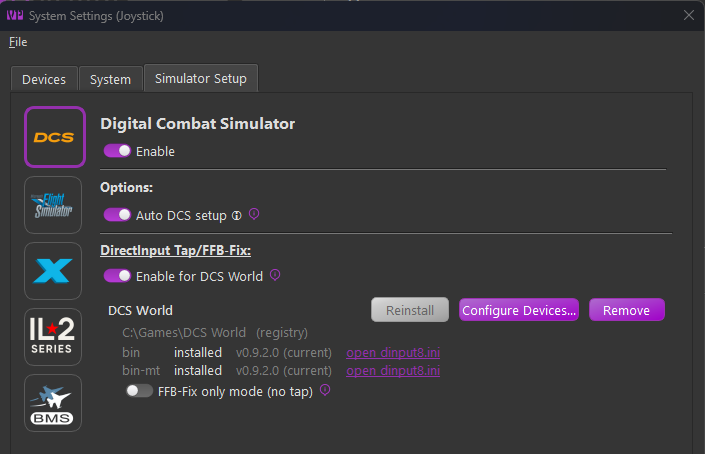
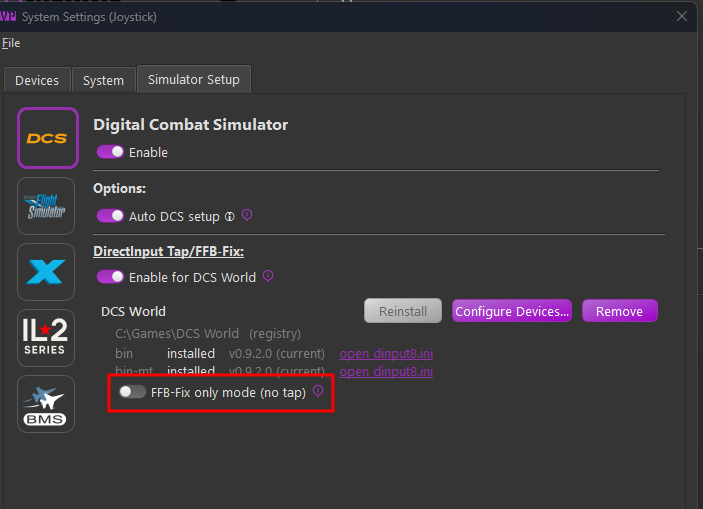
DCS: FFB-Fix only mode is not for DirectLink devices
The DCS panel offers an FFB-Fix only mode (no tap) toggle. It installs the wrapper with no capture rules, in a way that "fixes" deficiencies in the way DCS behaves in the presence of multiple FFB devices. This is only useful for VPforce devices using the traditional game-managed FFB effects.
MSFS and X-Plane compute no force feedback of their own - TelemFFB generates every force from telemetry - so they need no Tap. MSFS does need one step of its own - see MSFS: unbind your axes.
No forces at all in DCS, IL-2, or BMS once the Tap is installed? See Troubleshooting.
MSFS: unbind your axes
MSFS computes no force feedback of its own. There is nothing to capture and no exclusivity conflict, so TelemFFB generates the entire force model from telemetry: no Tap, no wrapper, no export script.
Unbind the device's axes in MSFS
This is the one step people miss. TelemFFB takes over the controls, and if the axes it drives are still bound in MSFS you get a closed loop: TelemFFB moves the stick, MSFS reads that as pilot input, the aircraft responds, and TelemFFB corrects again.
Symptoms if you skip it: jittery in-game controls on every speed change, and an elevator trim calibration that pulls and pushes too hard and never completes.
This applies to MSFS only. X-Plane needs no unbinding, because the TelemFFB plugin overrides the axes itself. See Axis Control & Spring Modes in the TelemFFB manual.
Elevator trim calibration
TelemFFB's Automatic Trim Calibration measures the stick deflection needed to hold the nose level across the trim range, producing a calibrated trim curve per airspeed. This is what makes the stick track correctly as speed changes. Run it at two or three airspeeds - slow flight, cruise, high cruise - and TelemFFB blends the stored speeds by airspeed in flight.
Calibrations can be exported and imported, so a good curve can be shared. An R² near 1.0 and little airspeed drift during the sweep indicate a clean measurement.
The stick moving continuously with airspeed is correct, not drift. Trim does not act on the aircraft directly; it changes which elevator deflection sits at zero stick force. The angle of attack you trim for stays constant, while the deflection that delivers it varies with dynamic pressure. That is the slope being measured.
Pedals, collectives, and trim wheels
A DirectInput device can serve any of TelemFFB's device roles, not just the joystick. Select the desired device in that role's selector the same way. Third-party FFB pedals work as pedals, and a spare force feedback stick makes a serviceable collective or trim wheel.
The FFB Axis choice
TelemFFB is fixed in which axis it drives for each role - pedals on X,
collective on Y, trim wheel on X - but a third-party device may put its
force feedback on any axis (pedals commonly on Rz). When a [DI]
device is selected for one of these roles, an FFB Axis selector
appears beside it, listing only the axes the device reports as
force-capable:
![The Collective row with a [DI] device selected, an FFB Axis list open on Auto, X and Y, and an Invert checkbox beside it.](images/ffb-axis-chooser.png)
- Auto uses the role's own axis when the device has it, otherwise the device's first force-capable axis. A single-axis pedal set needs no configuration at all.
- Pick an axis explicitly when Auto lands wrong - the sign of that is a spring holding an axis that does not move.
- Invert reverses the axis's direction - forces and position together, as if the hardware ran the other way. The DirectInput equivalent of reversing the axis in a device vendor's configuration tool, which generic hardware does not have.
Changes apply when settings are saved, simulator running or not - the effects move to the new axis within a moment, no restart. The choice belongs to the selected device: picking a different device starts over at Auto, uninverted. The joystick role is never affected; it always uses the device's native X and Y.
Forces on the wrong axis, or pushing the wrong way? See Troubleshooting.
What is different from VPforce hardware
A few TelemFFB features talk to VPforce firmware directly and have no DirectInput equivalent. They degrade cleanly rather than fail:
- VPforce Configurator integration (gain overrides, vpconf profile pushes) is skipped - there is no Configurator for the device.
- Firmware effects (the Advanced Spring Override's hardware spring adjuster, hardware detents) report "not supported on this device" where an aircraft profile calls for them.
- Force telemetry from the device is unavailable; features that read it fall back or disable themselves.
- The status bar shows "DirectInput device" where a VPforce device would show a firmware version.