MOZA AB6 / AB9
Base firmware 1.1.6.1
TelemFFB 3.0.261019
Set up DirectLink first, as described in Installation and Using DirectLink. Everything there applies to a MOZA base as it does to any DirectInput device, and this page adds only what is specific to MOZA. It was written from an AB9 setup for DCS World and Microsoft Flight Simulator 2024. The AB6 should behave identically; other MOZA force feedback bases are untested.
MOZA Cockpit is only needed to configure the base, not to run it. Use it once to set up the basic stick feel; those settings live in the base's own firmware and survive closing Cockpit. During a session, only TelemFFB needs to be running.
Close Cockpit before you fly
Leave MOZA Cockpit closed once the base is configured. Having it open during a session can cause loss of DI from DCS and/or TelemFFB. If you need to check or change a setting, open Cockpit, make the change, then close it again before starting the simulator.
MOZA Cockpit settings
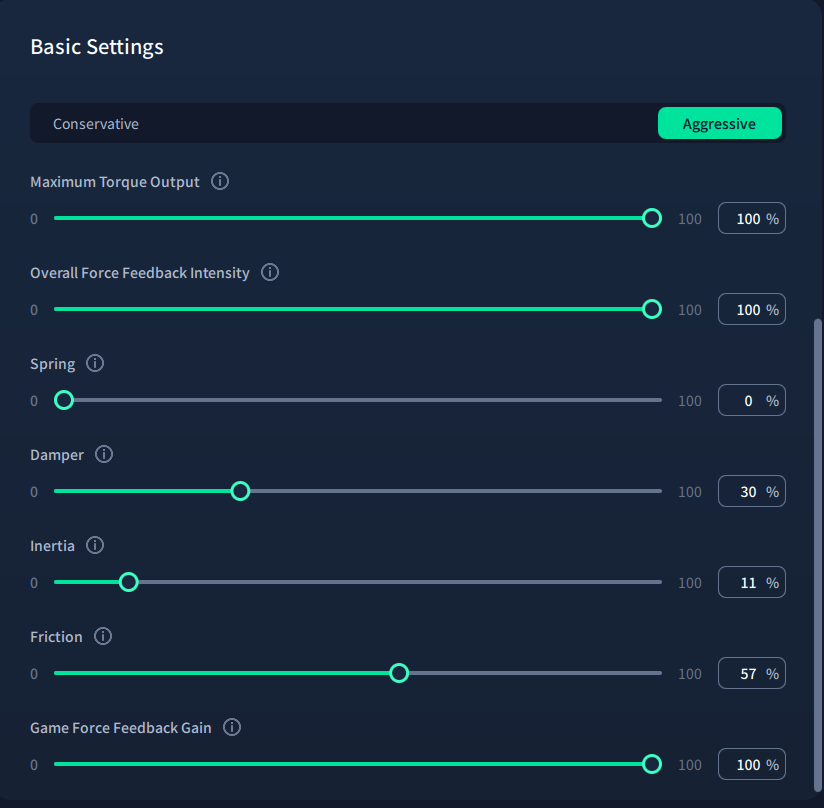
Open MOZA Cockpit to set these once; the base keeps them in its own firmware, so Cockpit does not need to stay open afterward.
- Set Spring to 0. This is already the default in DirectInput profiles. The spring is position-based and would fight the centering the simulator commands.
- Damper, Friction and Inertia can be tuned in Cockpit or in TelemFFB. They do not contest where the stick center is, but the two can still stack. If you tune them in TelemFFB, set Cockpit's values to 0.
Where to tune it
Where to tune damper, friction and inertia is a matter of preference; both feel fairly similar. On MOZA hardware they feel a nuance smoother set in Cockpit. The difference is subjective and only noticeable on the ground, possibly because these run in the base's own firmware rather than arriving as DirectInput condition effects. Tuning them in Cockpit does mean keeping per-aircraft profiles in Cockpit alongside the TelemFFB ones; since those live per-profile, switching aircraft means opening Cockpit again to load the matching one. Tuning them in TelemFFB instead avoids that: once the base's Basic Settings are configured, Cockpit can stay closed for every aircraft and every session.
Cockpit's Basic Settings are written to the base's own firmware at a hardware level, so they stay active on the base even with the PC turned off, whereas TelemFFB's effects only apply while TelemFFB is actually running and providing FFB - though that shouldn't be a deciding factor for actual use, since the base is only in use while the sim is active and TelemFFB is on.
Once DirectLink is enabled, the base appears in TelemFFB's device selectors as [DI] MOZA AB9 FFB Base. Assign it to the joystick role.
DCS World
Remove MOZA's export script (optional)
This step is optional. Leaving the script in place just means Cockpit keeps computing its own DCS forces alongside TelemFFB's, which is dead weight once the DirectInput Tap below is set up - but it's worth keeping installed if either applies:
- You want telemetry-based force feedback inside Force Sensing Mode (see F-16 and Force Sensing Mode below), since Cockpit disables DirectInput mode while Force Sensing is active, and TelemFFB can't reach the base there.
- You prefer Cockpit's own DCS telemetry algorithm to TelemFFB's for a particular aircraft.
Otherwise, remove it: Cockpit's DCS World Config dialog has Backup Script and Remove Script buttons for this.
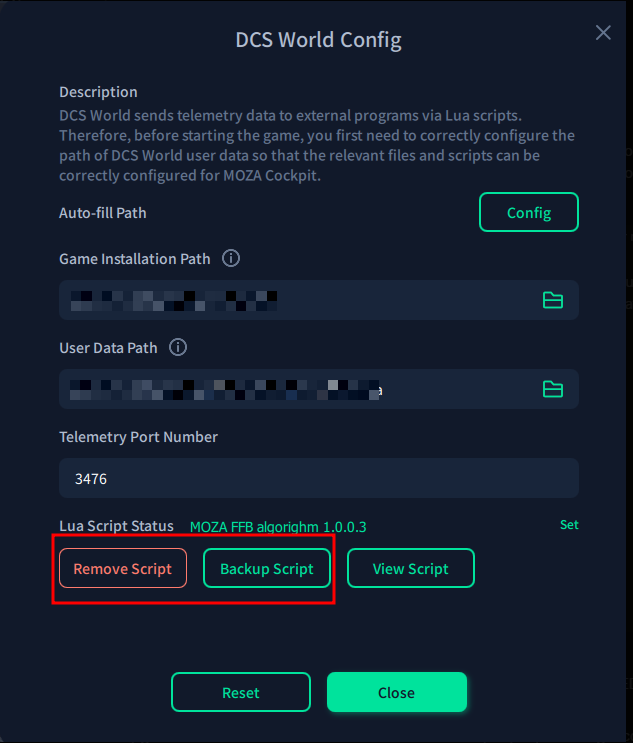
To do it by hand instead, back up Saved Games\DCS*\Scripts\Export.lua, then remove MOZA's line and its folder. Leave the Tacview, SRS and DCS-BIOS lines alone. Removing the script is what actually stops MOZA computing DCS forces; the Cockpit preset toggle is only insurance against the script being reinstated later.
Either way, set up the DirectInput Tap for DCS as for any DirectLink device, watching for one setting:
- Do not install the wrapper in FFB-Fix only mode; that captures nothing.
Start TelemFFB before DCS
The DirectInput Tap hooks in when DCS launches. From then on it captures DCS's own force feedback effects and passes them to TelemFFB to render. If TelemFFB is not running at launch, the Tap does not hook in for that session, and DCS sends its effects to your devices as it normally would.
That check is a safety guard. Without it, the Tap would capture DCS's effects even when TelemFFB was not there to render them, and you would get no force feedback from DCS at all.
If the Tap did not hook in, restart DCS with TelemFFB running. Once the Tap has hooked in, you can restart TelemFFB freely.
You can turn the guard off so that the start order no longer matters. Open the Tap's dinput8.ini in a text editor and set RequireTelemFFB to false. The quickest way to the file is the open dinput8.ini link in the DirectInput Tap section of TelemFFB's System Settings, shown for each of the configured simulators (DCS, IL-2, BMS), which opens it in your system text editor. TelemFFB has no setting for this, and the manual edit is deliberate: with the guard off, DCS's force feedback stops working whenever TelemFFB is not running, for example if you later stop using TelemFFB and forget to change the setting back. See How it works in the TelemFFB manual.
DCS, IL-2 Series and BMS all require the DirectInput Tap and share these restrictions. MSFS and X-Plane are exempt, since they compute no force feedback of their own and need no Tap.
F-16 and Force Sensing Mode
MOZA's Force Sensing Mode gives the base the feel of the F-16's force-sensing sidestick. However, the mode runs in the base's firmware and selecting it takes the base out of DirectInput mode. TelemFFB renders force feedback through DirectInput effects, so no TelemFFB effects can reach the stick while Force Sensing is active. For the Viper, that means choosing between the sidestick feel of Force Sensing and the full set of TelemFFB effects in DirectInput mode.
If you want Force Sensing and telemetry together, leave MOZA's export script in place and fly that aircraft in Cockpit alone, without TelemFFB running.
Microsoft Flight Simulator 2024
A MOZA base needs nothing different from any other DirectInput device for MSFS: unbind its axes, as described in MSFS: unbind your axes.
Troubleshooting
TelemFFB is running, but no effects can be felt
Make sure the DirectInput Tap was installed, and that you're on a TelemFFB version recent enough to support it.
The stick feels heavy and over-centered, and forces do not change with speed
MOZA's spring is still active. Open MOZA Cockpit and set Spring to 0 by hand.
Everything else is on the general Troubleshooting page.